Understanding WhatsApp Business API pricing is important for businesses planning customer support, notifications, marketing campaigns, and sales automation. The total cost usually depends on the type and volume of messages, the WhatsApp solution provider, setup requirements, and any additional platform features.
Thank you for reading this post, don't forget to subscribe!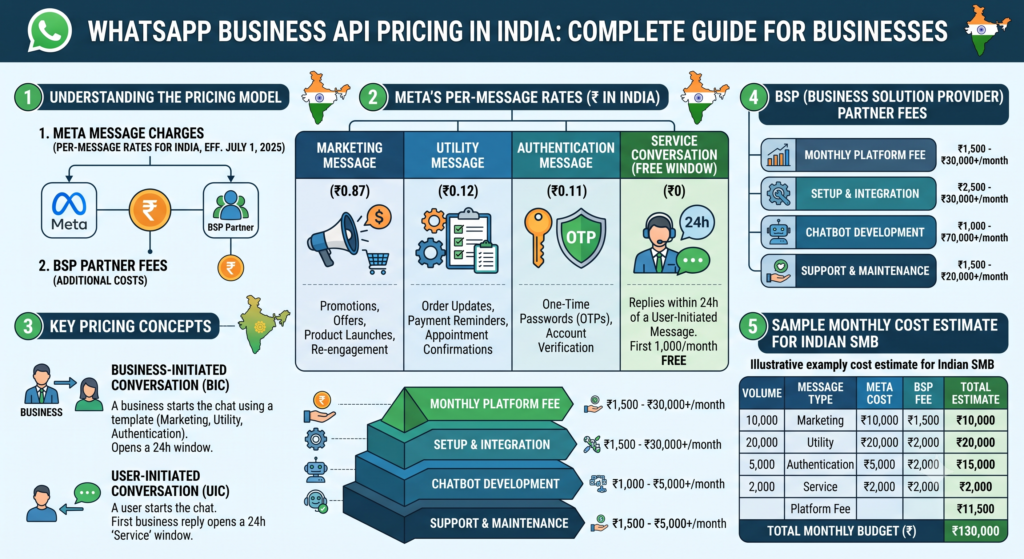
What determines WhatsApp Business API pricing?
WhatsApp Business API pricing is not always a single flat monthly fee. Businesses should review the following cost factors before choosing a solution:
- Message category: Pricing can vary for marketing, utility, authentication, and service conversations.
- Message volume: Higher monthly usage may affect the overall communication budget.
- Business Solution Provider fees: Some providers charge platform, setup, subscription, or support fees.
- Automation requirements: Chatbots, shared team inboxes, CRM integrations, analytics, and workflow automation may be included or billed separately.
- Template approval and compliance: Businesses must use approved templates where required and follow WhatsApp’s business messaging policies.
Common WhatsApp Business API cost components
1. Meta conversation or message charges
Meta pricing can change over time and may depend on the recipient’s country, message category, and current WhatsApp Business Platform rules. Always check the latest official pricing information before finalising a campaign budget.
2. Provider or platform charges
A provider may charge for access to a dashboard, team inbox, chatbot builder, campaign tools, analytics, integrations, onboarding, or technical support. Compare what is included instead of comparing only the headline price.
3. Setup and integration costs
Businesses may need help verifying their business, connecting a phone number, configuring templates, importing opted-in contacts, or integrating WhatsApp with a CRM and website. Ask whether setup is included in the plan.
Marketing messages versus service messages
Marketing messages are used for promotions, product launches, offers, and re-engagement. Utility messages support an existing transaction or customer request, such as order updates, appointment reminders, and delivery notifications. Service conversations are generally customer-initiated support interactions. The applicable rules and charges can differ, so businesses should classify messages correctly.
How to estimate your monthly budget
- Estimate the number of opted-in customers you will contact each month.
- Separate marketing, utility, authentication, and support use cases.
- Estimate how many messages each customer may receive.
- Add provider, software, integration, and support fees.
- Keep a buffer for seasonal campaigns and increased support demand.
How to reduce WhatsApp API costs
- Send messages only to relevant, opted-in audiences.
- Use automation for repetitive questions and route complex issues to agents.
- Combine useful information into clear, well-designed templates.
- Segment customers so each campaign reaches the right audience.
- Track delivery, engagement, conversions, and opt-outs to remove ineffective campaigns.
- Choose a plan that clearly explains monthly fees, message charges, setup costs, and support limits.
Questions to ask a WhatsApp API provider
- Are Meta charges included or billed separately?
- Is there a monthly subscription or minimum spend?
- Are onboarding, template setup, and number verification included?
- How many team members and automation workflows are included?
- Are CRM integrations and analytics available in the plan?
- What support is available if a template is rejected or messaging is restricted?
Conclusion
The best WhatsApp Business API pricing plan depends on your message categories, audience size, automation needs, and support workflow. Build your estimate around real use cases, confirm current Meta charges, and compare the complete cost of each provider before making a decision.